It’s been a while since I started on this topic so hopefully I’ll remember what I was attempting to say.
For a particular client we have had issues with a multi level dimension hierarchy that contains several thousand members. As I’ve said before and numerous people have experienced PPS filter performance is not great (word on the grapevine is though this is no longer an issue in v2). For various reasons, creating multiple dashboards to satisfy different users and restricting the users using OLAP security weren’t options so we came up with a “third way”.
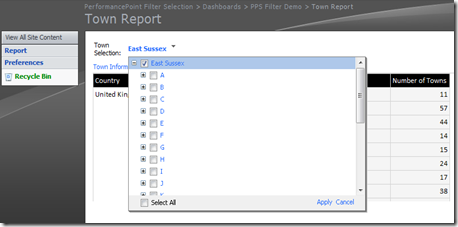
The third way was to provide the users with the ability to change their preferences and alter what they could see in the report hierarchy. First we needed to provide the users with a screen where they could make their selections. This was as simple as providing a PPS dashboard page that contained a filter and a report that used the filter.
The filter is based off of tabular data as explained in the last
post. The data itself is a parent child data set generated from the dimension that I want to restrict turning my source table of the dimension from something that looks like this;
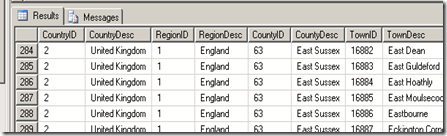
To something that looks like like this;
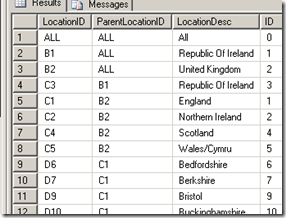
There are reasons I’ve done things like place a letter a the beginning of each of the ID’s. First it ensures that every member has a different ID and secondly it identifies the level of the original hierarchy the member is from without having to write queries to work out this out.
This has been placed into a view which is just a series of select statements from each level of the hierarchy with unions between. With that source view a tabular filter can be built and put into a dashboard page. At the top of the view though I’ve put a statement in for the “All” member. Remember this isn’t Analysis Services so there’s no dimension and no “All” member.
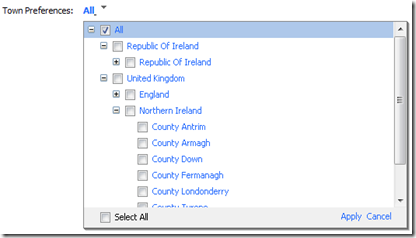
Again referencing back to the previous post on this, for the filter value to be retained in the ParameterValues table you will need to associate it with a report. A simple reporting services report will do and my preference is to provide the user with some feedback on the selections they’ve made. If they have selected the “All” member then they get a list of all of the locations otherwise only the members that have been selected.
The reporting services input parameter is from the filter passed into some SQL that in this case looks like this;
IF EXISTS (
SELECT 1
FROM vwDimTown
WHERE 'ALL' IN (@Location))
BEGIN
SELECT DISTINCT CountryDesc, RegionDesc
FROM vwDimTown
END
ELSE
BEGIN
SELECT DISTINCT CountryDesc, RegionDesc
FROM vwDimTown
WHERE 'D' + CAST(CountyID AS varchar(5))
IN (@Location)
OR 'C' + CAST(RegionID AS varchar(5))
IN (@Location)
OR 'B' + CAST(CountryID AS varchar(5))
IN (@Location)
END
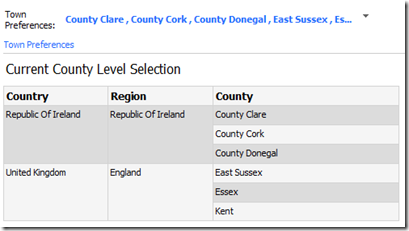
With the reporting services report on the page we now have a mechanism for capturing a users preferences like so;
Retrieving the preferences is the next part so for that we build on the SQL on the previous post that shows how to extract rows from the ParameterValues table in a meaningful way and for this we will put the logic into a stored procedure.
The procedure will perform a number of tasks in addition to pulling the selected members out of the PPSMonitoring database. We also need the final output to be formatted as an MDX set in the format {member 1, member 2, member 3, member n}. So lets break down the procedure into its constituent parts. First the declarations.
CREATE PROCEDURE uspGetFilterPreference
@Login varchar(255)
,@FilterID varchar(50)
,@StrToSet varchar(max) OUTPUT
The first of the variables, Login, is the logon of the person whose preferences we are trying to find. FilterID is the GUID identifying the filter we are interested in. Finally StrToSet is the output variable that will contain my final MDX set string.
DECLARE @Keys table(
MemberKey varchar(255))
DECLARE @OutputString varchar(max)
INSERT @Keys(MemberKey)
SELECT
REPLACE(
REPLACE(
CAST(d.Members.query('LocationID') AS VARCHAR (255)
), '<LocationID>', ''
), '</LocationID>', '')
AS MemberKey
FROM PPSMonitoring..ParameterValues
CROSS APPLY SerializedXml.nodes
('/NewDataSet/MyDataTable') AS d(Members)
WHERE [Login] = @Login
AND ParameterUniqueName = @FilterID
This section gets the values out of the ParameterValues table and loads them into a table variable called Keys. Along the way we strip out any XML syntax (element names, tags, etc.) leaving a table variable comtaining the key values from the tabular filter.
IF EXISTS (
SELECT 1
FROM @Keys
WHERE MemberKey = 'ALL')
BEGIN
SELECT @OutputString =
'[Town].[County].Members'
END
Here we check to see if the “All” member has been selected. If it has then we set the OutputString variable to be all members from the County attribute hierarchy of my Town dimension and NOT the user hierarchy. This is really important for later on.
If the “All” member has not been selected then we work out what members have been selected and using a set of union statements get a list of true dimension keys
ELSE
BEGIN
SELECT @OutputString =
SUBSTRING((
SELECT ', '
+ '[Town].[County].&['
+ CAST(ID AS varchar(10))
+ ']'
FROM (
SELECT ID
FROM DimTownTabular
WHERE ParentLocationID IN
(SELECT MemberKey FROM @Keys
WHERE LEFT(MemberKey, 1) = 'B')
UNION
SELECT ID FROM dbo.DimTownTabular
WHERE ParentLocationID IN
(SELECT MemberKey FROM @Keys
WHERE LEFT(MemberKey, 1) = 'C')
UNION
SELECT ID FROM dbo.DimTownTabular
WHERE LocationID IN
(SELECT MemberKey FROM @Keys
WHERE LEFT(MemberKey, 1) = 'D')
) a
FOR XML PATH( '' )), 3, 1000 )
END
This is why we have the ID column and the letter prefix. It makes this bit a lot easier to manage. The output of this and the value that get dropped into the OutputString variable is almost exactly what we want. The only issue is that by using the FOR XML PATH statement to produce a comma delimited string of the members it replaces “&“ symbols with “&”. A quick …
SELECT @StrToSet = '{' + REPLACE(@OutputString,'.&', '.&')
+ '}'
… fixes that and puts the curly brackets around to finish off our set syntax and the procedure as a whole.
Run the procedure against the username and filter you’re querying and depending on how many members you selected in the tabular filter you should get something like this;
{[Town].[County].&[26], [Town].[County].&[63]}Now I would recommend that everyone goes out and gets this book
And go to chapter 10 where there is a section called “Using Stored Procedures for Dynamic Security”. This explains how to use a simple analysis service stored procedure (DLL) to affect what members in a dimension users are able to see. All the code is doing is retrieving a number of rows from a SQL query and passing it into analysis services security as an MDX set object. In my stored procedure I made it simpler and just executed a stored procedure and output a string.
Unfortunately I haven’t got this all packaged up as a project but my recommendation would be to create a C# project build the DLL and also build a command line application that references the DLL just to test everything is working OK.
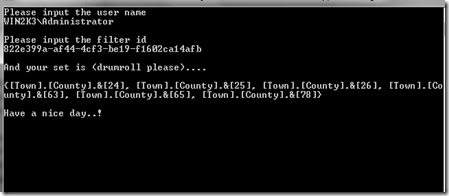
Also things like error handling and connection string configuration to where the PPS database should all be handled in this code. My function is called “GetPreferredCounties” which has two input variables. The username and the filter ID, both as strings.
After registering the assembly with the Analysis Server we can now setup the final piece. In one of the roles in your cube (you have created one right?), within the dimension data security for the County attribute of the Town dimension I can now put in the syntax to make the stored procedure call and retrieve the string.
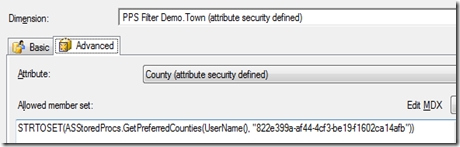
In my example it looks like this.
STRTOSET(PPSFilterASStoredProcs.GetPreferredCounties(
UserName()
,"822e399a-af44-4cf3-be19-f1602ca14afb"))
The USERNAME function will pass through the current users logon credentials to the function and the STRTOSET function will take the output string from the function and convert it into something analysis service will understand is a set.
If all has gone well Analysis Services is now using the output from the stored procedure to provide a restricted list of dimension members to a user. A list that the user themselves can control without any other system being put in the way or elevated privileges being provided.
Build another page on your dashboard and this time create and add a report that just displays some info about your filtered dimension. Attach this to a filter based on the analysis services dimension (I tend to use named sets) and now you will only see the members that match your preferences selection.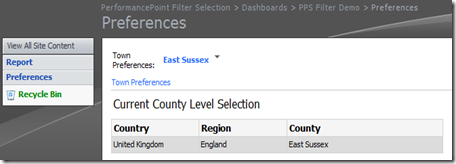
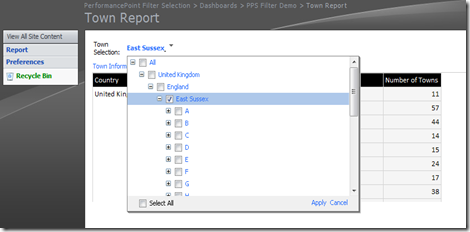
Now to tidy up that hierarchy a bit. All those parent members that are just getting in the way and making the navigation more complex than it needs to be. Pay a visit to Boyan Penev’s blog and take a look at a post on Filtering Unneeded Dimension Members in PerformancePoint Filters. By making the source query or named set for your filter based on the logic in the post you just get the top most level necessary which makes the filter a hell of a lot neater and with the added bonus of the top level member becoming the default when you first access it.
There’s a lot going on in this post and unfortunately I haven’t had the chance to package it up into something I can redistribute easily but if there’s any questions then ask away and I’ll help if I can.


![laroux[1]](http://lh3.ggpht.com/_C8feMND9TeA/Sm8jmrTREqI/AAAAAAAAAJg/W3FNfBPtlzg/s1600-h/laroux12.jpg "laroux[1]")
![florence_and_the_machine[1]](http://lh4.ggpht.com/_C8feMND9TeA/Sm8jncSzb2I/AAAAAAAAAJo/v7m1scSlVyI/s1600-h/florence_and_the_machine12.jpg "florence_and_the_machine[1]")


![665.x600.mr.titus.rev[1]](http://lh5.ggpht.com/_C8feMND9TeA/SbaKxqxU5GI/AAAAAAAAAHY/ph6fXcYODPE/s1600-h/665.x600.mr.titus.rev12.jpg "665.x600.mr.titus.rev[1]")

 Posts
Posts


